
Accessibility menu is on
RAKBANK Business App

RAKBANK Business App

Business banking – in the palm of your hand

Introducing the RAKBANK Business App

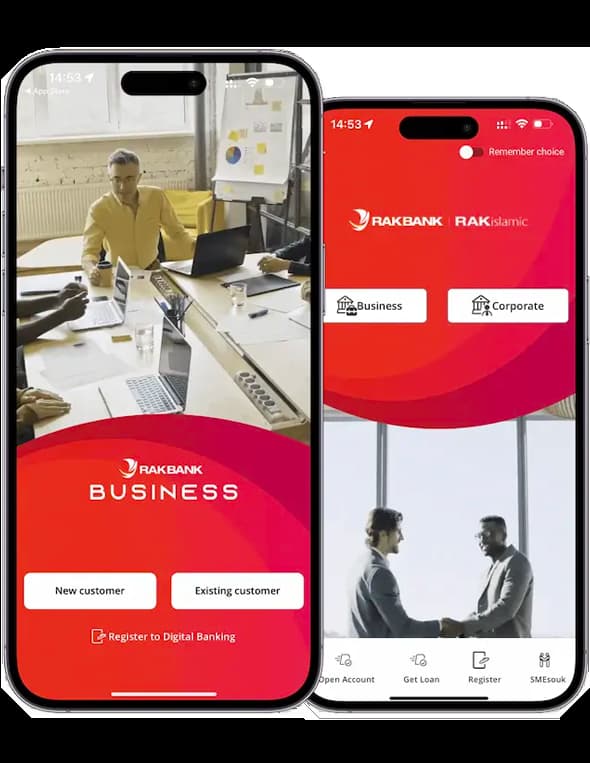
The RAKBANK Business App offers secure access to manage your business accounts anytime, anywhere. Our user-friendly platform simplifies banking with features like bill payments, money transfers and transaction approvals, providing a seamless banking experience.

test

Powerful Features and New Capabilities

The RAKBANK Business App provides you with round-the-clock access to your bank account, enabling you to manage your finances at any time and from anywhere with an internet connection. With real-time transaction monitoring and seamless payment processing, our app offers a convenient and secure solution for businesses to streamline financial management and stay on top of cash flow.

test

Enhanced User Experience

The RAKBANK Business App was designed with excellent user experience in mind. Our focus on usability ensures that every feature of the app is easy to navigate, so that individuals and teams can manage transactions easily and securely.

  • New and user-friendly interface for easy navigation
  • Biometric login for a single signatory
  • Multi-platform receipt sharing for seamless collaboration
test

Convenient Banking Features

RAKBANK Business App provides a reliable and efficient platform that allows you to conduct all your Business Banking needs and manage your business finances.

  • Convenient fund transfers, VAT payments, bill payments, and credit card payments
  • Cardless cash withdrawals using MobileCash
  • Secure transactions with RAKToken two-factor authentication for peace of mind 
test

Advanced Financial Management Tools

  • Approve transactions on the go initiated by maker / initiator for increased efficiency

RAKBANK Business App features

Services Business Login Corporate Login
Convenient login and beneficiary addition for FT within the UAE using mobile-based RAKToken, replacing the AAA hard token -
Two-factor authentication for securing transactions through the mobile app using RAKToken -
Make VAT payments to FTA directly through the app
Upgrade to RAKBANK Business Elite 
Additional security with role-based workflow transaction authorisation (maker-checker approval)
*For Business login customers, kindly contact the nearest RAKBANK branch to apply for workflow transaction authorisation.
Request for a No-Liability Certificate
Access account balances on select devices using biometric authentication on the mobile app -
Single set of unified login credentials for both desktop browser and mobile banking apps
Apply for Business Debit Card, submit requests for chequebooks, request bank statements, and more directly through the app
Learn about and apply for various banking products with just a single click using "Discover and Apply"
Instantly chat with agents for assistance through the enhanced live chat feature available on mobile devices
Enhanced ATM locator on the mobile app
Enquire about Trade Finance account details
Request for Trade Finance services like LCs, guarantees and STLs (currently available only through the desktop browser)
View outstanding bills and make instant payments using your bank account in one go for various services like Etisalat, DEWA, SEWA, FEWA, Du, Salik, EMAAR
Make safe and seamless fund transfers and remittances
Upload your Trade Licence and financial transaction documents (using the desktop browser) for easy verification
info

How to Register on the RAKBANK Business App

To register for a Business login, you have two options: you can either visit your nearest branch or use our self-service option on the RAKBANK Business App.

Follow these steps to register for a Business login on the mobile app:

  1. Go to the Google Play Store or Apple App Store on your mobile device.
  2. Search for "RAKBANK Business" and download it.
  3. Select the "Business" login type.
  4. Click on the "Register" link on the screen.
  5. Enter your Account number or Debit Card number.
  6. Enter other details like your passport number and date of birth when asked, and verify your registered mobile number.
  7. Enter the OTP sent to your mobile number to confirm your registered mobile number.
  8. Enter your Debit Card PIN.
  9. Set up a preferred login password.

For a Corporate login, you can use the same credentials you use for Corporate Digital Banking desktop browser application to log in to our mobile app.

Please note that our RAKBANK Business App can be used to access both SME and Corporate Banking logins. You can preset your preferred login type (Business or Corporate) using the "Remember Me" option before logging into our app. You also have the ability to switch to the Business or Corporate login page.

Next time you try to log in to the app, the system will render the login page based on your preferred login type.

RAKToken is a mobile app-based two-factor authentication solution used to improve the security of transactions done on RAKBANK Digital Banking. It also allows you to authorize beneficiary/payee creation as an alternative to SMS OTP.

  • As a RAKBANK customer, RAKToken allows you to authorize transactions exceeding a certain daily threshold limit. This threshold is a per-day threshold and shall apply irrespective of whether it is done in a single transaction or a total of multiple transactions.
  • For RAKBANK Business and Corporate customers, who are using a maker-checker workflow authorization, RAKToken also allows you to log into the Digital Banking platform.

You can register for RAKToken using your debit card or account number. The registration process varies depending on the type of customer you are.

A. Business login customer with a debit card and no maker-checker workflow access:

  1. Download RAKBANK Business Mobile App
  2. Select the Type of login access as ‘Business’
  3. Select ‘Sign up for RAKToken’ button on the login screen.
  4. Enter your account/debit card/debit card number and click on Proceed.
  5. Enter your passport and date of birth.
  6. Your registered mobile number will be displayed. If it is correct, click on Proceed.
  7. Enter the OTP received on your registered mobile number and click on Proceed.
  8. Enter your card PIN and click on Proceed.
  9. Create a 4-digit RAKToken PIN as per your choice, re-enter, and click on Proceed.

B. Business login customer with maker-checker workflow access:

  1. Download RAKBANK Business Mobile App
  2. Select the Type of login access as ‘Business’
  3. Select ‘Sign up for RAKToken’ button on the login screen.
  4. Enter your account/debit card/debit card number and click on Proceed.
  5. Enter your passport and date of birth.
  6. Your registered mobile number will be displayed. If it is correct, click on Proceed.
  7. Enter the OTP received on your registered mobile number and click on Proceed.
  8. Enter your digital banking UserID and Password.
  9. Create a 4-digit RAKToken PIN as per your choice, re-enter, and click on Proceed.

C. Corporate login customer:

  1. Download RAKBANK Business Mobile App.
  2. Select the Type of login access as ‘Corporate’.
  3. Select ‘Sign up for RAKToken’ button on the login screen.
  4. Enter your corporate ID, corporate digital banking user ID, and password.
  5. Your registered mobile number will be displayed. If it is correct, click on Proceed.
  6. Enter the OTP received on your registered mobile number and click on Proceed.
  7. Create a 4-digit RAKToken PIN as per your choice, re-enter, and click on Proceed.

RAKToken is a security feature that adds an extra layer of protection to your transactions. To use RAKToken when making transactions, follow these steps:

A. When transacting using RAKBANK Digital Banking:

  1. During the transaction review step, you will be prompted to enter a RAKToken code.
  2. Select the ‘Get RAKToken Code’ button on the login page of RAKBANK Business App.
  3. Enter your 4 digit RAKToken PIN to get a 6 digit RAKToken code.
  4. Enter the 6 digit RAKToken code on the ‘Review & Confirm’ step of the transaction screen.
  5. Proceed to continue with the transaction.

B. When transacting on the RAKBANK Business App and the transaction amount exceeds the threshold:

  1. During the transaction review step, you will be prompted to enter your RAKToken PIN.
  2. The device will automatically generate the RAKToken code to authorise the transaction.

Please call us or visit your nearest RAKBANK branch for further assistance to unlock your RAKToken.

Quick Balance Inquiry (QBI) is a feature that allows RAKBANK Business Banking customers to check their account balances instantly using a biometric mode supported on their mobile device.

Here’s how you can access it:

  • Open the latest version of the RAKBANK Business App and log into your account.
  • Once you log into the app, tap on the burger menu, go to the app settings, and complete the QBI registration using the simple on-screen instructions.
  • After registering for QBI, you can then use the touch ID, fingerprint, or face ID option on your iPhone or Android device to view your balances instantly, without the need to log in.


Yes, you can change your business user ID and password using RAKBANK Business App after you log in.

We’re here to help

Image text

Your all-in-one financial partner

Simplify your banking experience with our feature-rich app. From payments to payroll, our comprehensive Banking Solutions provide everything you need to manage your business finances from one secure and easy-to-use platform.

Icon Text
expand_more
visibility_offAccessibility